¶ Overview
One of the Treasurer's most important responsibilities is making MSA's funds available when they are needed. While transferring funds between independently-managed accounts is relatively trivial, moving funds out of university-managed accounts requires adherence to a formal reimbursement process. There are many rules and requirements that can seem overwhelming at first. Through practice, however, the Treasurer will find this process natural.
This page outlines all that the Treasurer would need to know to process reimbursements for 80% of cases. Start by learning the information on this page first. After you've developed some comfort with the process, you may find it helpful to review the extensive finance slide deck provided by the ASUC below:
 Callink Finances Slide Deck For more advanced, detailed information
You are probably already familiar with the word "reimbursements" as a term. A reimbursement, however, is only a specific example of a broader term called a "Purchase Request". Purchase Requests have a number of categories. Here are some examples:
- Honorariums (Jummah, Ilm Classes, Banquet, etc)
- Invoices (Venue Booking Fees, Catering, etc)
- Any other purchases (Food, Equipment, Gas, etc)
¶ Prerequisites
In order to process reimbursements and other financial logistics with the LEAD Center, the Treasurer must be designated as a Finances Agent. In order to become an agent you must fill out the following quiz:
During the transition process, the President must also take this quiz (in addition to the Treasurer) such that reimbursements that are made out in the Treasurer's name may be approved by someone other than the Treasurer. More on this below.
¶ Callink Tour
Callink is a service provided by the ASUC, through which various administrative tasks are completed. One section of the MSA's Callink portal allows for the processing of purchase requests and maintaining our university-managed financial accounts.
¶ Accessing the Finances Tab
Now that you've completed the Finances Agent Quiz (linked above), you will have access to the MSA's Finances tab on Callink. To get to this tab:
- Log into Callink and visit the MSA's portal here.
- Click on the three lines in the top left.
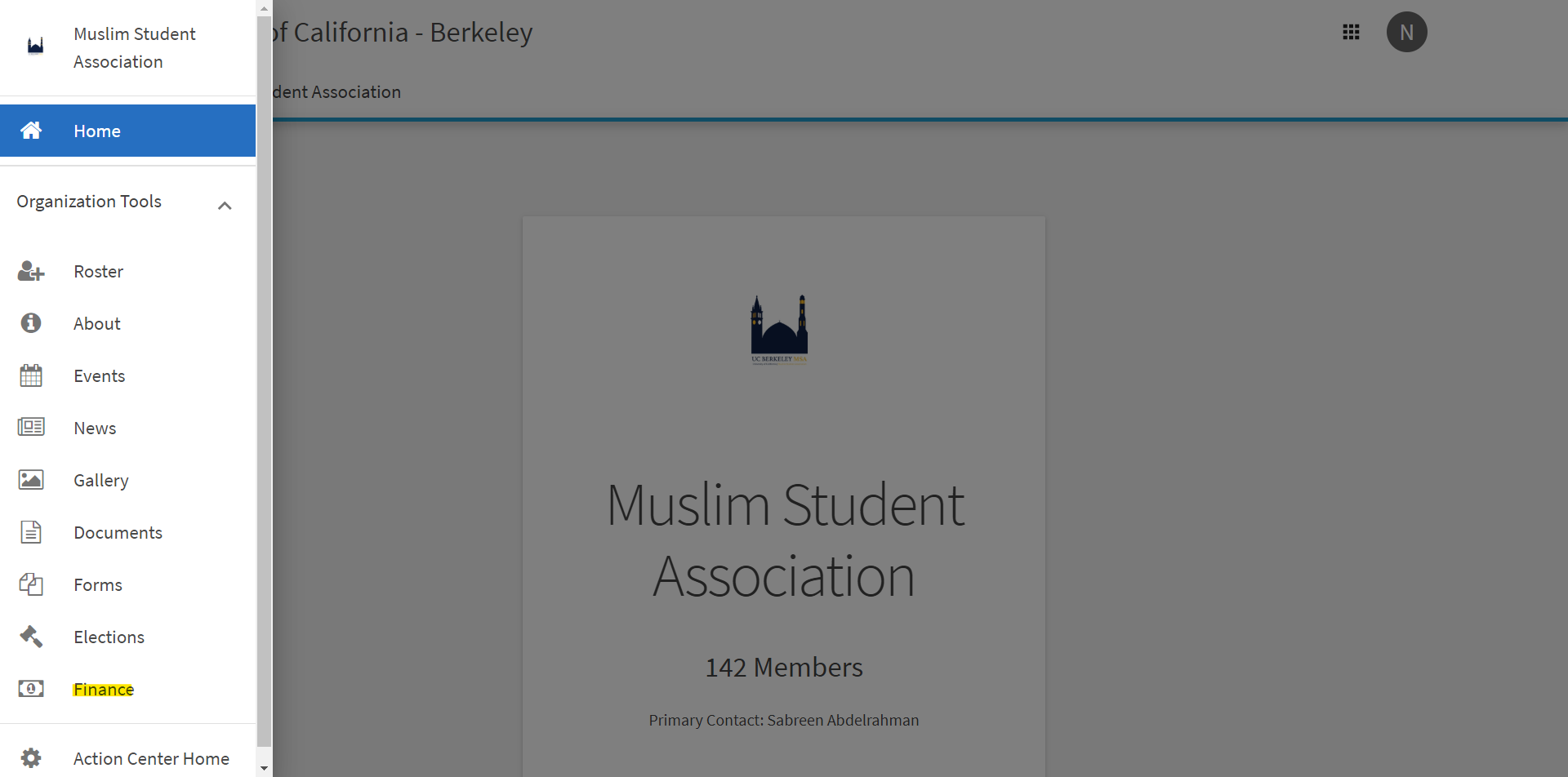
- Click on Finance.
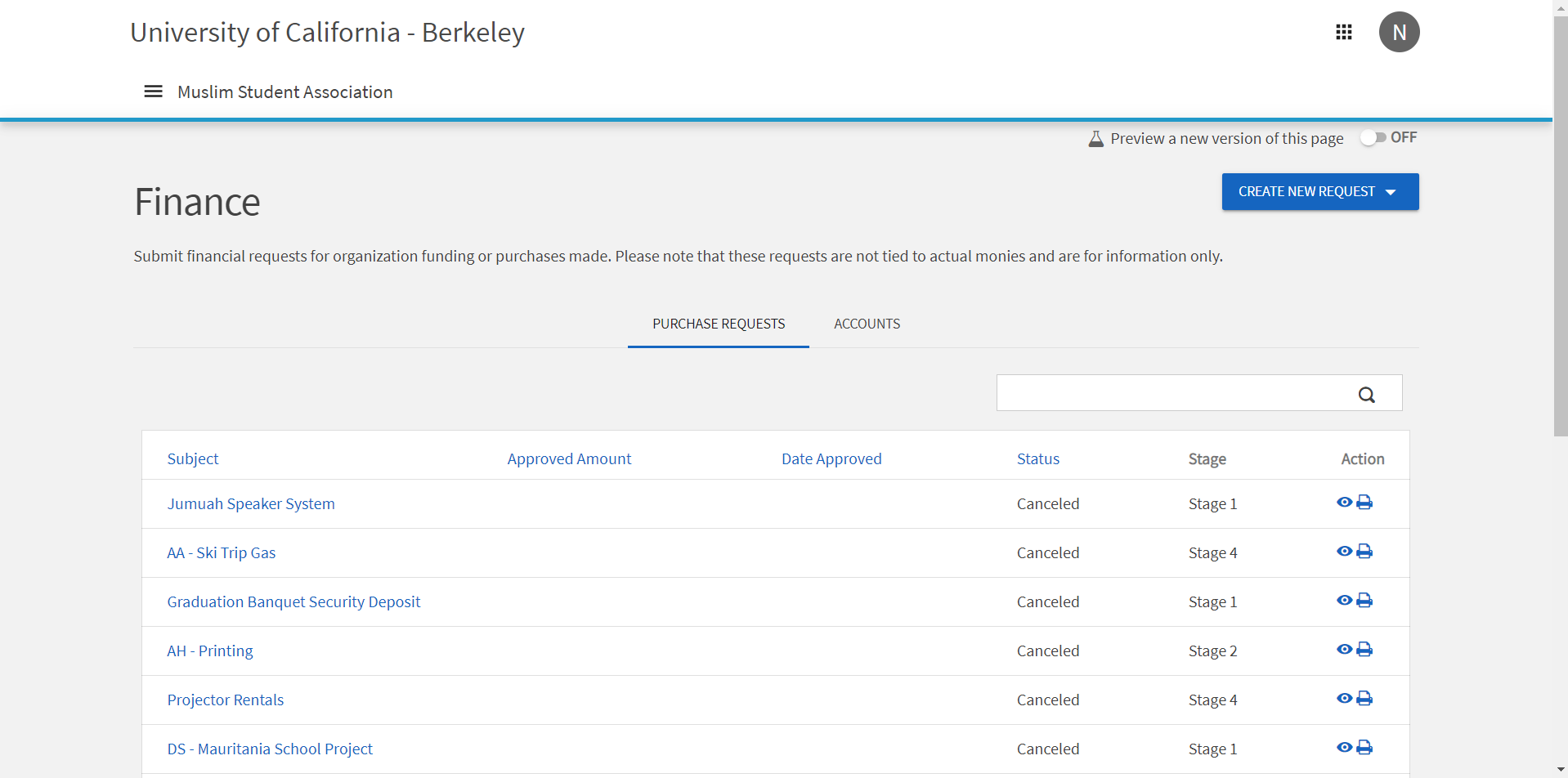
You will now see thePurchase Requestspage. This page lists all MSA reimbursements across many years.
¶ Viewing Purchase Requests
A Purchase Request is a general term for a number of various types of reimbursements and transactions. Let's click on one and inspect the various information associated with a Purchase Request.
- Navigate to the
Financespage (see above) and make sure you are on thePurchase Requeststab. - Search for
F19in the search box in the top right.
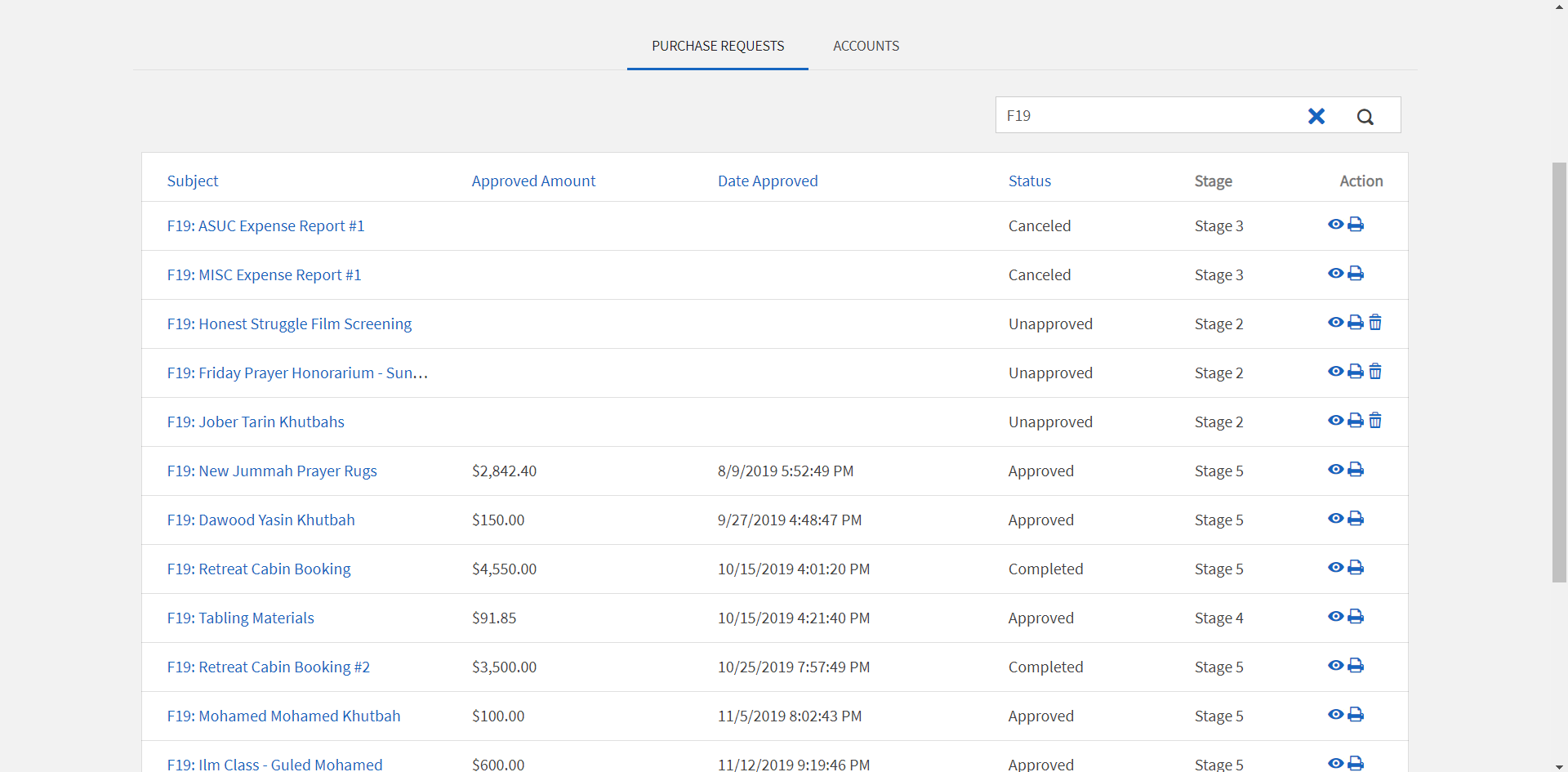
- Click on a Purchase Request from the list.
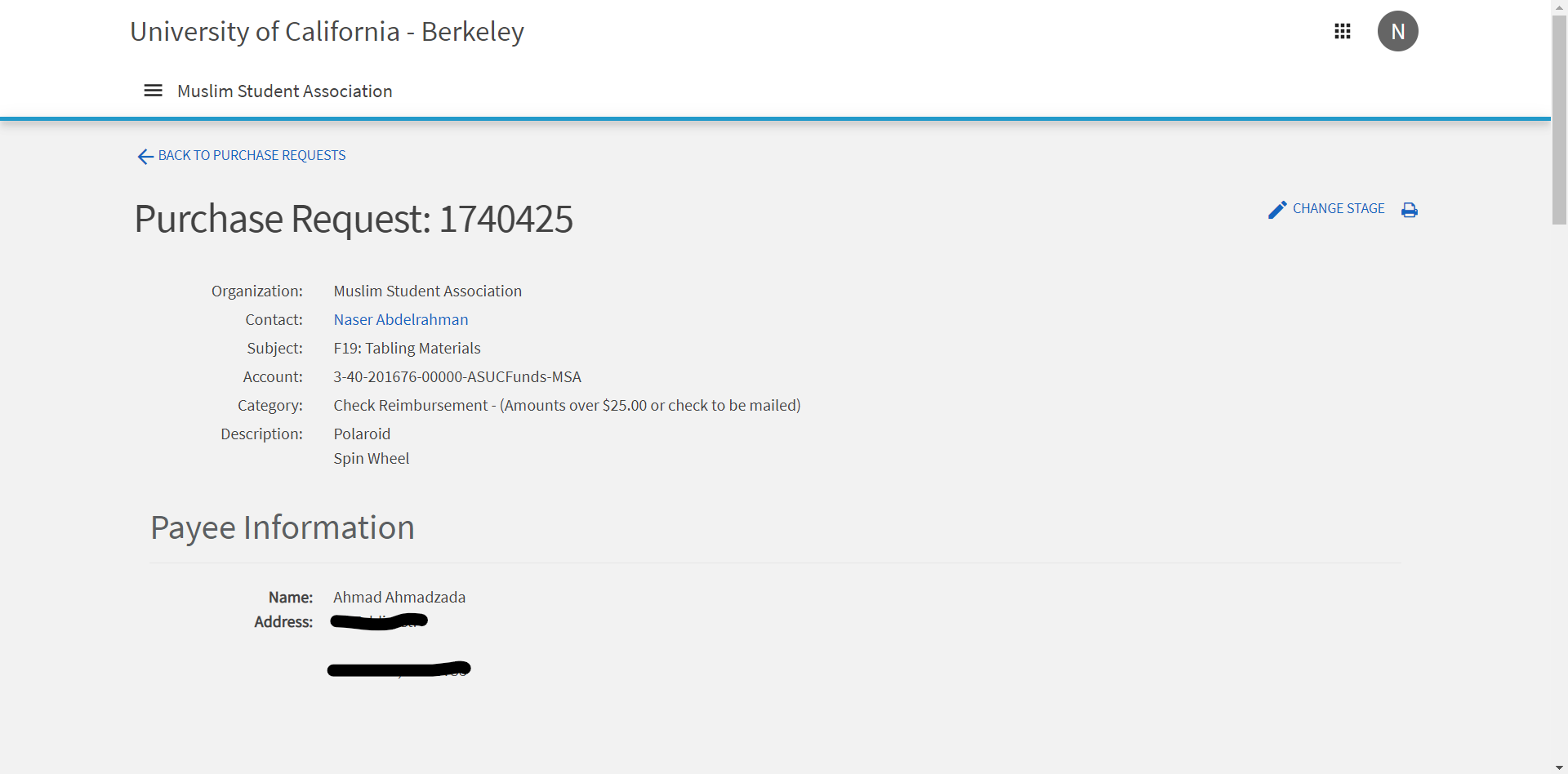
You can now browse all the information associated with this Purchase Request. We will get more in depth with what all these fields mean when we talk about how to submit a Purchase Request (below).
¶ Viewing University-Managed Accounts
University-managed accounts are bank accounts that are directly controlled by the LEAD Center.
Navigate to the Finances page (see above) and make sure you are on the Accounts tab.
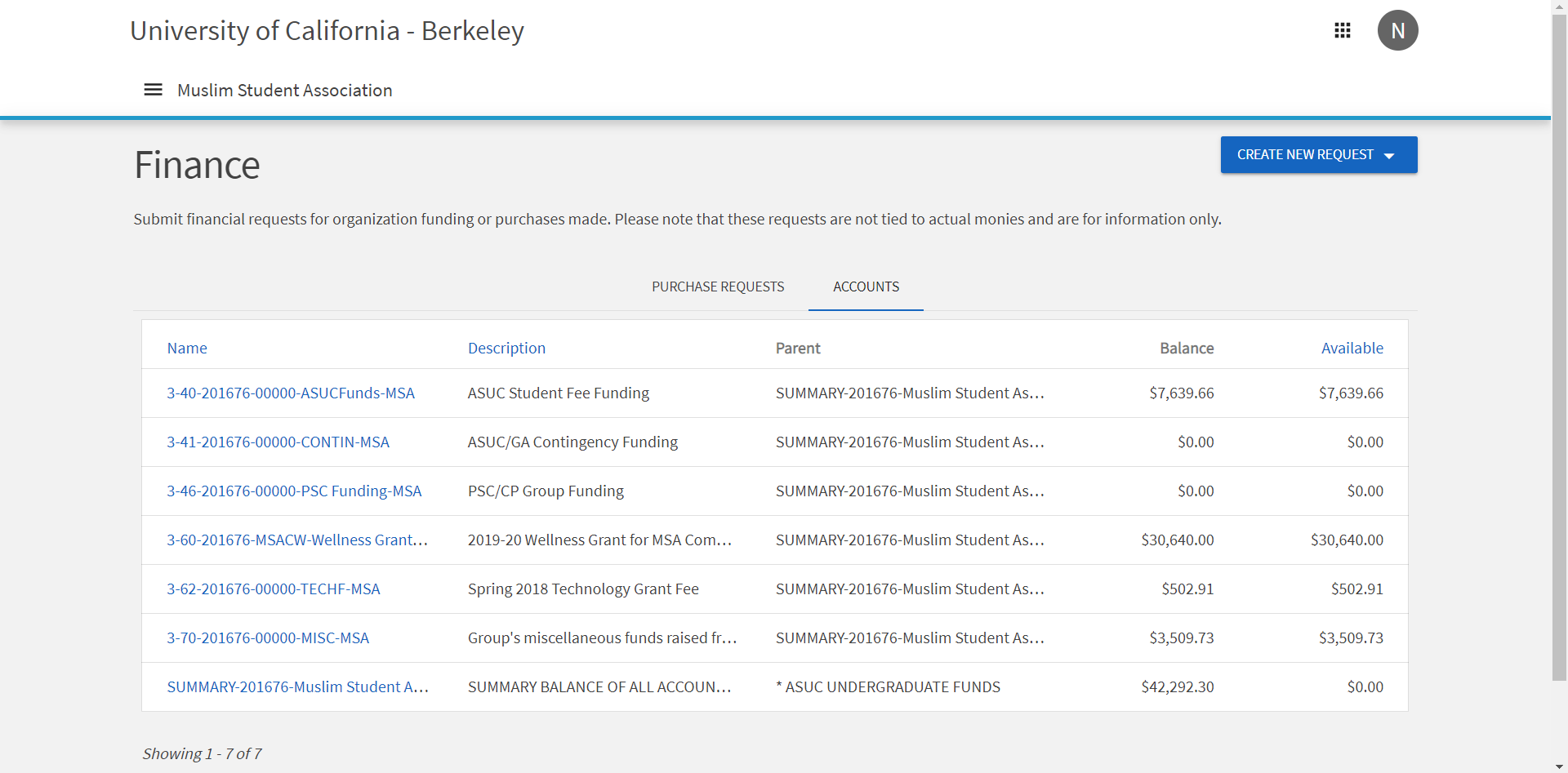
You can view all of the MSA's university-managed financial accounts here. For more information about MSA's various financial accounts, visit Financial Accounts page.
To view Purchase Requests specific to a particular account, you can click on the account name where a log of transactions will be displayed.
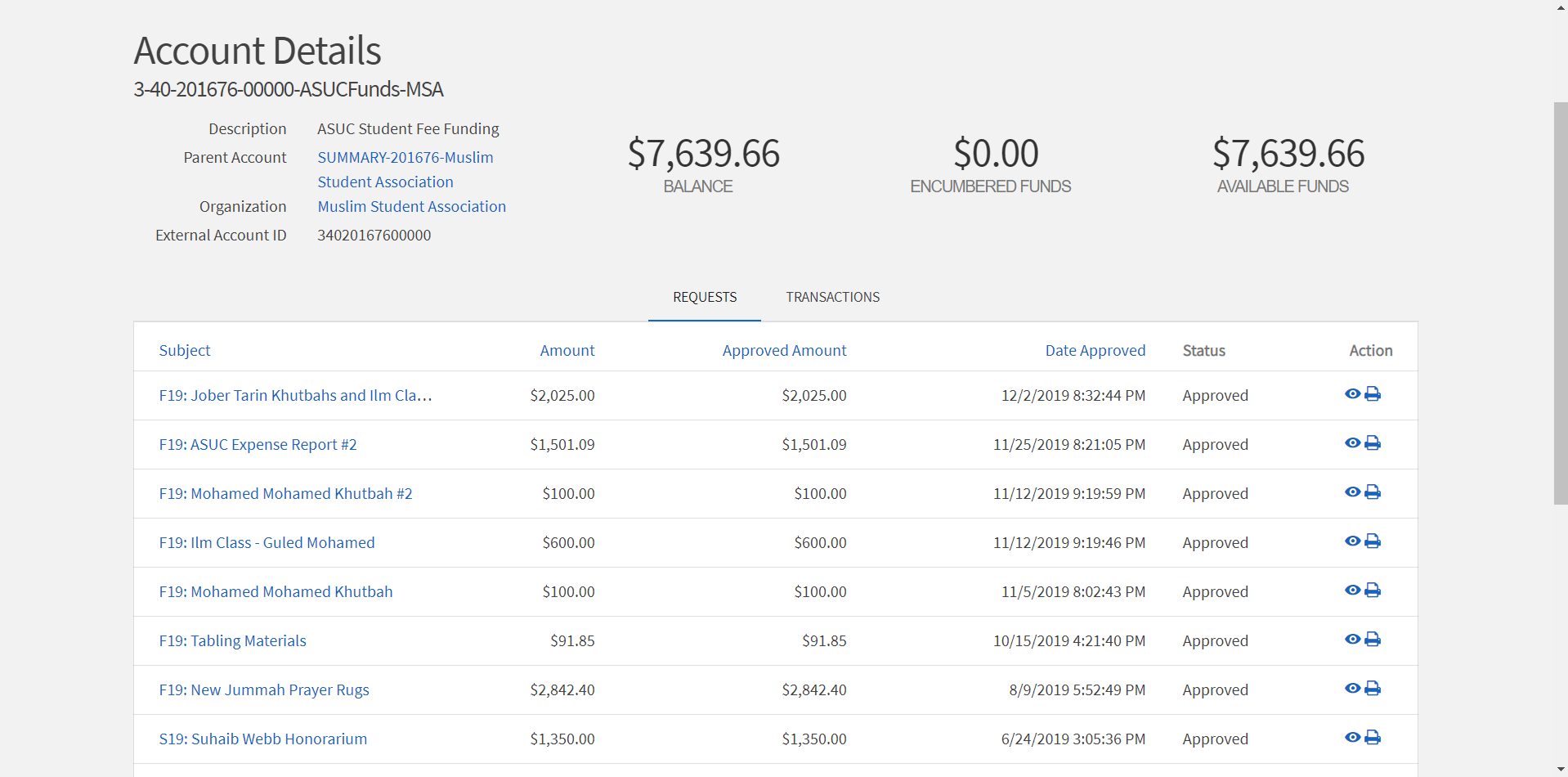
¶ What is a Purchase Request?
Now that you have some familiarity with Callink, we will cover the information required to submit a Purchase Request. Through these instructions, you will better understand the different kinds of Purchase Requests.
- Navigate to the
Financespage (see above) and make sure you are on thePurchase Requeststab. - Click on Create New Request in the top right.
¶ I. Request Details
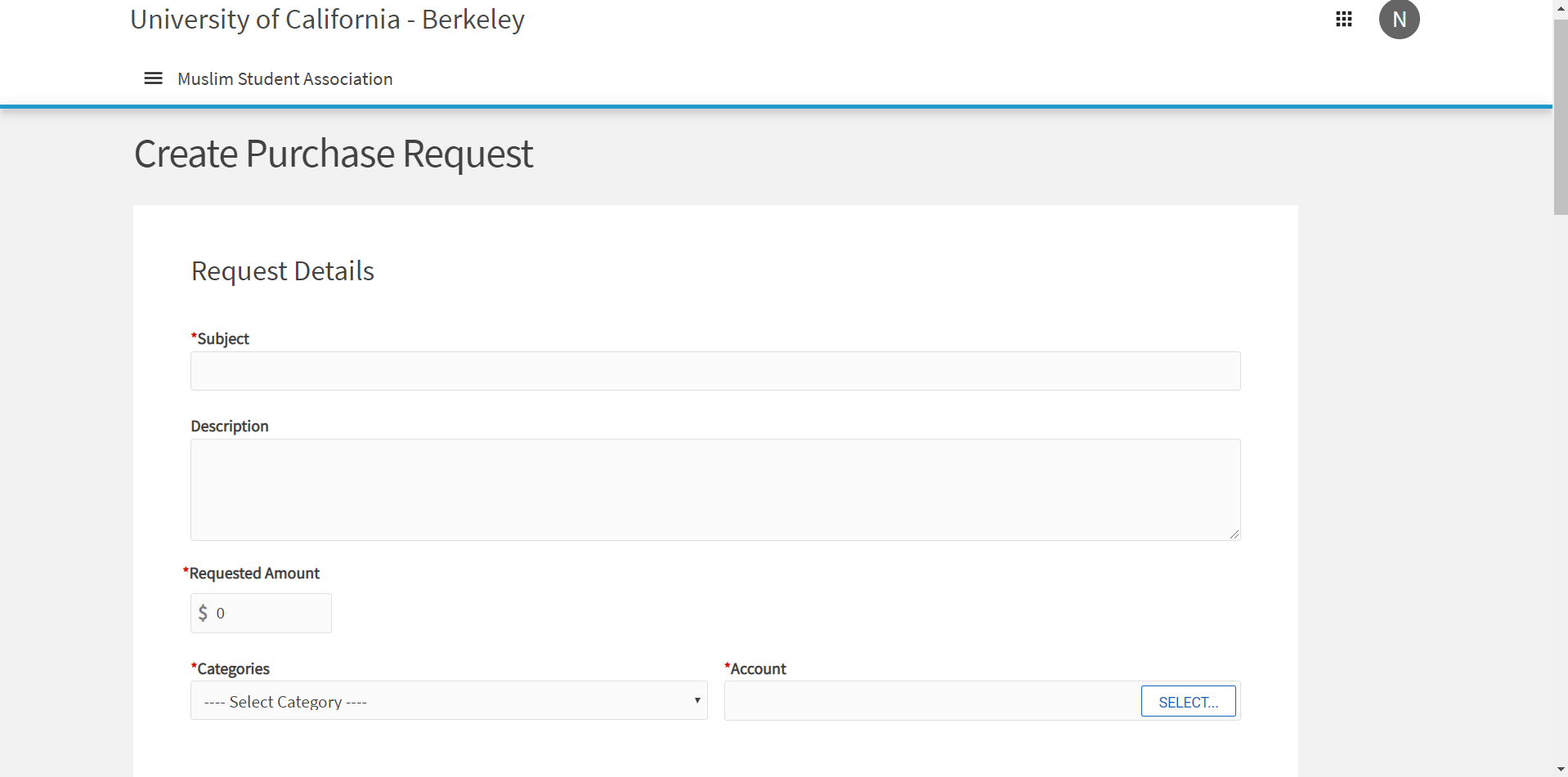
The first section of a Purchase Request is titled Request Details. See the following table for a description of each of the fields in this section.
¶ 1. Subject
This is the name of the Purchase Request.
You must follow this format: S/F##: Descriptive Name where S/F##: indicates the spring (S) or fall (F) semesters followed by a two digit year (ie. 19 for 2019). A correct example of this format is S20: Jummah Honorarium - Dawood Yasin (1/23)
It is difficult to sort Purchase Requests by semester on Callink. Beginning every Purchase Request subject with S/F## allows you to quickly isolate transactions for a given semester.
¶ 2. Description
Use this field to record important details.
There is no requirement for what to include here but including financial calculations and a list of purchased items could be helpful for when you need to refer back to this Purchase Request. For example, when processing an honorarium for an Ilm Class, it may be helpful to include the number of hours the class lasted for and the scholar's hourly rate.
¶ 3. Requested Amount
This is the amount of the reimbursement.
¶ 4. Categories
This is the type of the Purchase Request. See the table below.
| Category | Examples | Description |
|---|---|---|
| ASUC Credit Card Purchase | Winter Retreat Cabins | The ASUC provides you with a credit card to spend directly from university-managed accounts. For large one-time purchases. |
| Cash Reimbursement | Cookies, Paper, etc. | For reimbursements under $25. A physical receipt is required. |
| Check Reimbursement | Divvy Bulk Reimbursements | For reimbursements over $25. A physical receipt is required. |
| Check to Payee | Film Screening Invoice | Used to send checks to those who the MSA owes money in form of an invoice or award. Must attach a print out of the invoice. |
| Personal Services Agreement | Scholar / Guest Speaker Honorariums | Payment made out an individual for specific services. PSA's cannot be made out to students. Requires a signed contract form. |
| Stipend | Recurring Friday Khateeb Honorarium | A payment made out to an individual for specific services, usually recurring (ie monthly). Requires a signed contract form for the first submission. |
¶ 5. Account
This is the university-managed account from where you would like the Purchase Request to pull money. Each account has its own restrictions. Learn more about each financial account here.
¶ II. Payee Information
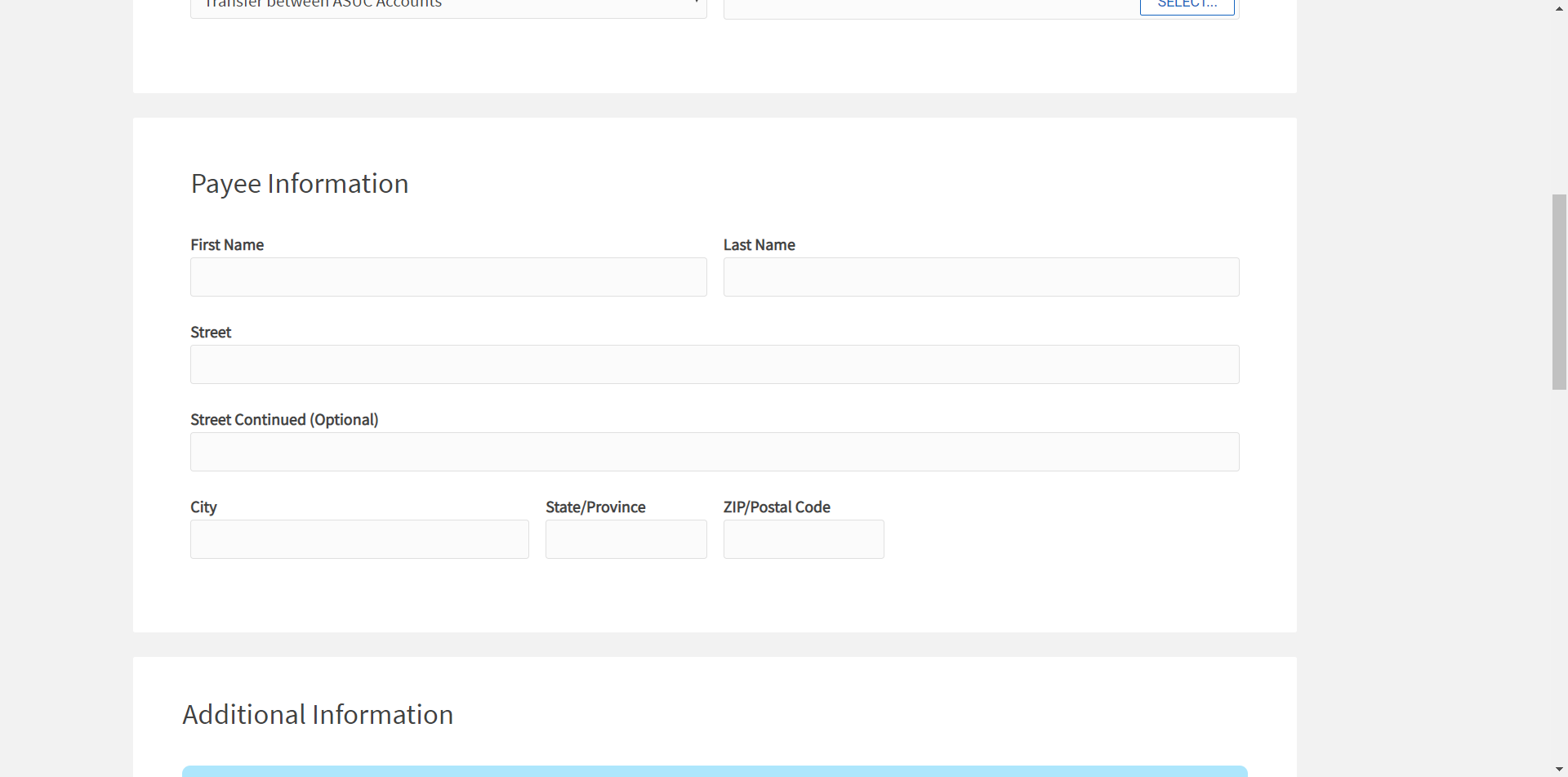
The second section of a Purchase Request is titled Payee Information. This information is for the person/entity that the MSA owes money. The fields are self explanatory.
¶ III. Additional Information
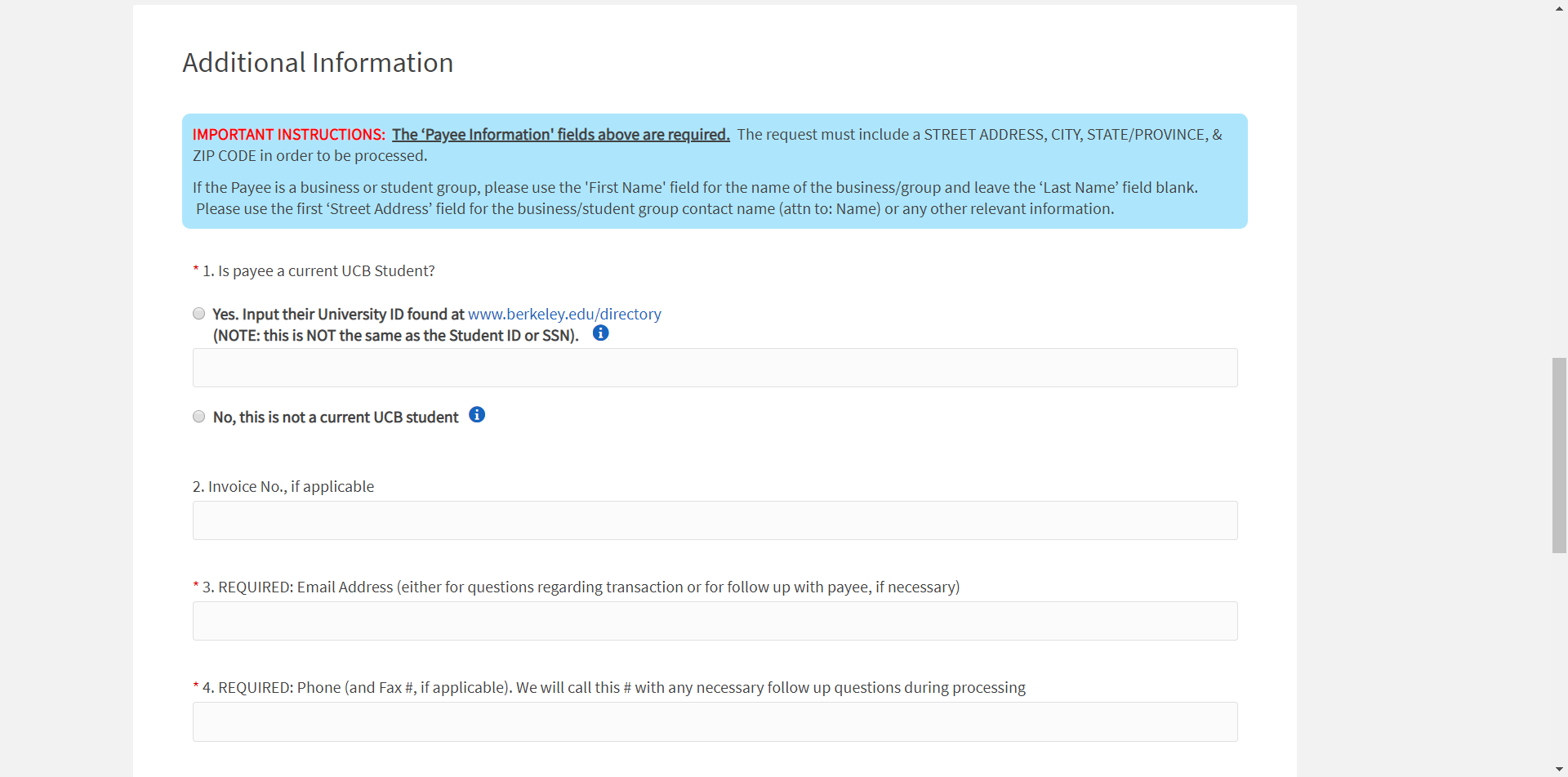
The last section of a Purchase Request is titled Additional Information. See instructions below.
¶ 1. Is Payee a current UCB Student?
If yes, find the student's University ID using the link provided. This is not the same as the student's Student ID.
¶ 2. Invoice No.
This is optional. In case you are processing a Purchase Request for an invoice, input the invoice number here for future reference.
¶ 3. Email Address
Input the email address of the payee (the person/entity getting paid).
¶ 4. Phone
Input the phone number of the payee (the person/entity getting paid).
¶ 5. Expenditure Action
If you select Hold for Pickup the LEAD Center will send you an email when the money is ready to be picked up from their 4th floor office in Eshleman Hall. Only the payee (the person/entity getting paid) can pick this up and will be required to show an ID. If the payee is not local, then do not select this option.
If you select Mail to Payee the LEAD Center will mail the money to the address that was provided. This is an appropriate option for payees who are not frequently on-campus (ie Khateebs, Scholars, etc.)
¶ How do I submit a Purchase Request?
After learning about Purchase Requests, we will now go over how to successfully submit them.
- Go to the Callink Finances page.
- Click on Create New Request in the top right.
- Input all information and submit the Purchase Request.
- Go back to the Callink Finances page and search for the Purchase Request you just submitted.
- Click on the Purchase Request.
- In the top right click on Change Stage
- In the new page, click on Stage 1 and change it to Stage 2
- Click save to submit the stage change.
- Go back to the Callink Finances page and search for the Purchase Request again.
- Click on the Purchase Request.
- Click on the
 icon in the top right and print out the Purchase Request.
 - Staple any required documents to the back of the Purchase Request (ie, receipts, contract forms, resumes, invoices, etc)
- Take the Purchase Request to the LEAD Center office on the 4th floor of Eshleman Hall during regular business hours.
- Walk inside and find the Purchase Request tray on the front desk.
- Stamp the top of the Purchase Request with the provided date stamp before placing it into the Purchase Request tray.
- Wait around one week for the LEAD Center to send you an email with the status of your request. If there are any problems that require attention, the LEAD Center will let you know.
Stage 1andStage 2mean? Each purchase request must go through at least 4 stages in order to be approved. A Purchase Request atStage 1means that it has been created. A Purchase Request atStage 2means that it has been authorized by an Agent from the MSA (the Treasurer or President in this case). A Purchase Request atStage 3means that it has some problems that need to be addressed. A Purchase Request atStage 4 or 5means that it was sent for approval or has received approval.
Stage 2. If your name is listed under the payee information for the Purchase Request, you will need someone else to move the Purchase Request toStage 2. This is why the MSA President must also become a Financial Agent by taking the quiz listed in the prerequisites at the top of this page.
¶ Reasons for a Denied Purchase Request
Here are some common reasons for a Purchase Request being delayed/denied. Make sure to review your request before submitting to avoid any extra work.
- Receipt is a screenshot (from a phone or laptop) and not an original PDF
- Amazon receipts show that the items were not yet shipped
- Need to wait until the items have shipped before downloading a receipt from Amazon
- Contracted Services Agreement form for honorariums have a printed name on the signature line instead of a signature
¶ Common Purchase Request Cases
Now that you have some exposure to processing Purchase Requests in general, we will go over common Purchase Request cases and the specific instructions for a successful outcome.
¶ Friday Prayer & Ilm Class Honorarium
Every week, the MSA hosts an on-campus Friday prayer service. We gift each of our khateebs an honorarium for an amount that is predetermined by the master budget each semester. See the Budgets page for more information on the master budget.
¶ Category: Personal Services Agreement
Because this expense is not in return for any purchased goods but is an honorarium for an individual's services, this purchase request is catgorized as a Personal Services Agreement (PSA). PSA's require that Purchase Requests come with a signed contract form.
¶ Process
The Treasurer should fill out all relevant information in the contract form linked above (except for the name, time, location, and date) and send a copy to the Educational Coordinator. When booking scholars, the Educational Coordinator will fill out the date, time and location of the Friday Prayer and include the name of the scholar. S/he will send this contract out to scholars who must fill out their home address and SSN and sign on the appropriate line at the bottom of the contract. The Educational Coordinator will also ask for a resume from the scholar as they are also required for PSA's. Once the Educational Coordinator delivers the signed contract form and resume to the Treasurer, the Treasurer will process a Purchase Request on Callink. When submitting the Purchase Request to the LEAD Center, the Treasurer will staple the signed contract form and resume to the back.
¶ Divvy Bulk Reimbursements
Another common, yet unique, Purchase Request case deals the processing of Divvy receipts for reimbursements. For more information about managing the Divvy credit card system and view the Divvy website visit the page below.
¶ Statements
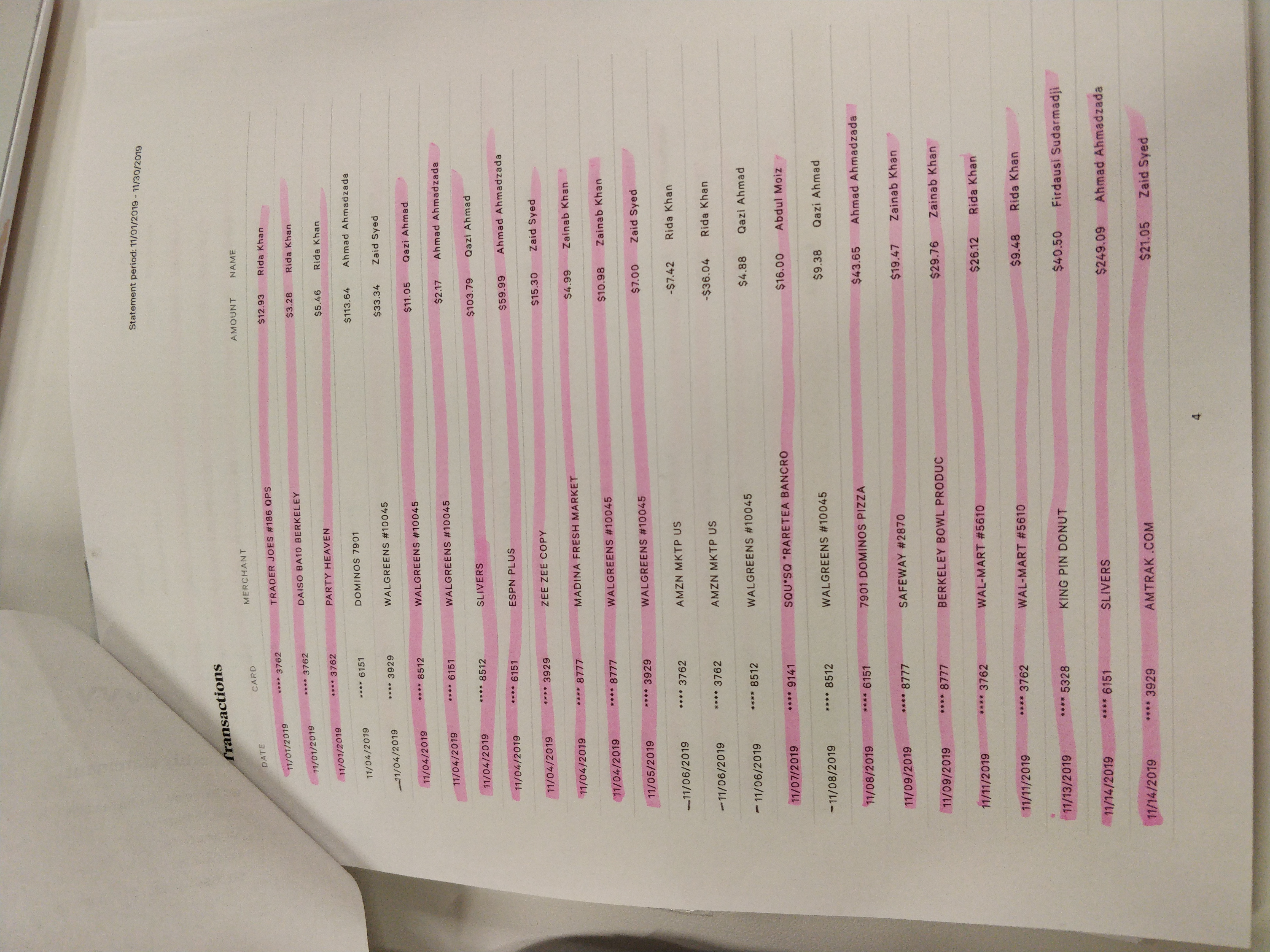
At the beginning of every month, a bank statement will be posted in the Statements page of the Divvy website. Each statement lists out all the transactions from the previous month along with the credit card numbers and names of the purchasers. On the first page, the Treasurer's name is also displayed. This document is critical for the success of a reimbursement request with the LEAD Center because it provides proof that although different individuals made purchases, the credit cards are all linked to the same account allowing for the reimbursement check to be written to the Treasurer's name. See an example of a Divvy statement here:
¶ Process
After the beginning of each month, the Treasurer should combine all collected receipts from Divvy transactions for the previous month and submit them as a single Purchase Request. The payee's name on the Purchase Request should be the Treasurer's name. If completed successfully, the Treasurer will receive a check which s/he can deposit into the MSA's Bank of the West account and subsequently transfer money back into our Divvy account. See an overview of MSA's financial accounts here.
¶ Instructions
- Log into Divvy and navigate to the
Transactionspage - Use the filters to limit the transactions that appear to those with a date between the last Divvy reimbursement and the 1st of the current month.
- Review any incomplete and unreviewed transactions (that are missing receipts or information) and deal with them as is instructed here.
- Once all transactions have been reviewed or locked, print out all electronic receipts and the Divvy statement(s) for this time period.
- With the Divvy statement(s) in front of you, go through every physical receipt and printed electronic receipts and highlight the rows that correspond to them. After going through all receipts, your statement(s) should look something like this:
- Add up all the highlighted purchases. This amount will be your reimbursement amount.
- Go to Callink and create a new Purchase Request
- Input the following information:
- Subject: Type something along the lines of
S/F## Divvy Expenses #1 - Description: Mention the time range for this group of transactions so that you can easily reference the last reimbursed Divvy purchase the next time you submit a Divvy reimbursement Purchase Request.
- Requested Amount: Input the total you calculated in step 6 above.
- Category: Check Reimbursement
- Account: Select either ASUC, MISC, or a grant account (ie Wellness Fund)
- Payee Information: Input your (Treasurer's) information
- Is Payee a current UCB Student?: Mark yes, and input your (Treasurer's) University ID
- Email: Input your (Treasurer's) email
- Phone: Input your (Treasurer's) phone
- Expenditure Action: Hold for Pickup
- Subject: Type something along the lines of
- Submit the Purchase Request
- Ask the President to move the Purchase Request to Stage 2
- Print out the Purchase Request
- Staple the Purchase Request followed by the highlighted Divvy statement(s) and then finally all the physical and printed electronic receipts together into one package.
- Write
MSA SPECIAL CASE: Give to Nguyet Tranon the Purchase Request page in large letters near the top and highlight this statement. This will inform all LEAD Center staff that this MSA Purchase Request was granted an exception and should be processed by the manager. - Take this Purchase Request with the previously mentioned documents attached to the LEAD Center office on the 4th floor of Eshleman Hall during regular business hours.
- Walk inside and find the Purchase Request tray on the front desk.
- Stamp the top of the Purchase Request with the provided date stamp before placing it into the Purchase Request tray.
- Wait around one week for the LEAD Center to send you an email with the status of your request. If there are any problems that require attention, the LEAD Center will let you know.
If all goes well without any emails asking for more information (which is rarely the case), you'll be asked to pick up the check from the LEAD Center. Take this check and deposit it directly into the MSA's Bank of the West account. Then you may transfer funds back into MSA's Divvy account.
¶ Comprehension Quiz
If you were instructed to read this page as part of an online training curriculum, you must submit this quiz and answer all questions correctly. In the case that you do not answer a question correctly, you may view which questions were incorrect and take the quiz again.