¶ Overview
There are a lot of variables in increasing community involvement in MSA. One way is through marketing events well. More often that not, the better the marketing, the better the turnout.
¶ Graphics
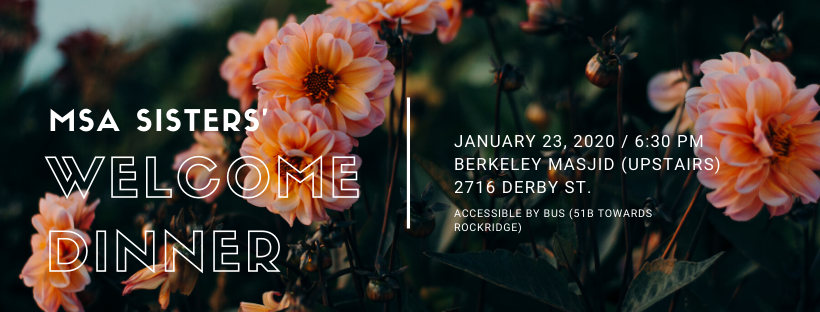
Make a graphic for events! This makes it easier to share the event in the newsletter or on Instagram, and also communicates to the public the quick details of the event.
Canva is a great, quick resource to making graphics and accounts are free. Your graphic should always include:
- The title of your event
- The location
- The time
- A brief description (Optional)
It’s usually easiest if the type of graphic you’re making is a Facebook Event Cover. These have the dimensions needed to be seen on Facebook events, and also fit well in the newsletter. But, flyers are great for posting within the group.
¶ Facebook Events: Type of event and Privacy Settings
Depending on the event and its audience, there are multiple types of events that can be made on Facebook.
| Type of Event | Description |
|---|---|
| Public Event (by the official MSA Facebook page) | Only board members will be able to create this type of event. If a committee head or community member would like to do so, have them reach out to you. Who can see this: Everyone. These events are fully public, and can be shared in other groups. You don’t have to have liked the MSA page or be in the MSA group to see, share, or attend this event. How to make it: Use the Facebook page. This is different from the group! Hit the Events tab on the left, and click the Create an Event button. For Category, you can choose Other, and make sure to change the posting permissions so that anyone can post in the event. Type of event: This is good for events that you want a large attendance for. Community Nights, Collaboration Events, Ilm Classes, etc. should all use this method. This is especially important for events aimed at other communities. |
| Private Event (within the MSA Facebook group, or within Brothers/Sisters’ groups.) | Who can see this: Only members within the group. You don’t have to be invited to the event to see it, but you do have to be in the MSA group. Not everyone in the community chooses to be in the group. This type of event cannot be posted in other groups or pages. How to make it: Use the Facebook group. Hit the Events tab on the left, and create a new event. Type of event: This is good for events that you want aimed only at Muslims. Keep in mind though, that not every Muslim at Cal, nor every Muslim active in MSA, is in the MSA group. They may not see this event. This may be a good option for Brothers’/Sisters’/Joint Socials (though you won’t be able to post it in the Brothers/Sisters pages) or lowkey events like Committee Socials. |
| Public Event (made by an individual) | Who can see it: Everyone. This is a public event. How to make it: On your own home page, hit the Events tab on the left. Create a new event. Make sure it’s public. Type of event: An event that you want to be open to everyone, but not specifically hosted by the MSA. You will be able to share it in the MSA group and invite members, but it’s hosted by you or a separate organization. |
| Private Event (made by an individual) | Who can see it: Only the people that are invited. This is very limited How to make it: On your own home page, hit the Events tab on the left. Create a new event. Make sure it’s private. Type of event: This would be an event that you want very specific people to go to. This is good for closed meetings, closed socials, etc. |
¶ Marketing
How to now push your event!
¶ Inviting Guests
This depends on the type of event and privacy settings. If your event is public (or private within a group) most people will be able to see it anyway, but inviting people ensures that the event is seen.
Tip: When inviting people, go to your groups on the left, and click UC Berkeley Muslim Student Association. This will not invite all of the members in the group, only those who are on your friend list.
All board members should separately invite people, as they each have different circles of Facebook friends.
¶ Posting the Event
Make your Facebook event at least a week in advance of its date! If it's a large scale event (Banquet, Alumni Dinner, Elections, etc.) it should be made a month in advance.
If it is a public event (made either by you or by the MSA page), copy and paste the event link and post it in the MSA group, along with a short blurb/caption about the event. If it’s a private event made within the group, it will already be posted. You should still repost the event closer to the date.
If you have a recurring event (Ilm class, Study Session, etc.) it’s a great idea to post a picture of the previous event. It gives people an idea of what the event looks like, and also peer pressures them into attending/coming again.
You can also post within the event page. This is useful if you want to communicate to people who have hit Going/Interested (i.e. talking about transportation, filling out RSVPs, or last minute changes).
¶ Other Social Media
| Types | Description |
|---|---|
| Calendar | Please put all events and its details on the MSA bCal. This will make it public to anyone who uses the bCal or goes on the Events tab of the website. This also makes it easier to have all information in one place when writing the Newsletter |
| Newsletter | All events should be included in the weekly Newsletter. Remind other board members, leadership, or community members to contact you if they want their own events to be included. |
| Post a graphic of your event on Instagram stories the morning of as a reminder. |
¶ Comprehension Quiz
If you were instructed to read this page as part of an online training curriculum, you must submit this quiz and answer all questions correctly. In the case that you do not answer a question correctly, you may view which questions were incorrect and take the quiz again.