¶ Overview
This page seeks to define some guidelines and principles that facilitate the organization and usefulness of our Google Drive documentation base. Organization is critical for the long term success of our association. Future leadership should be able to access previous documentation that pertains to their line of work with ease. All board members, committee heads, and other members who are granted access to the MSA Google Drive must uphold these principles.
¶ Drive vs Wiki
At first glance, the UCBMSA Google Drive may appear to serve a similar purpose to our UCBMSA Wiki (this website). However, an important distinction exists.
Our Google Drive is a database of all kinds of files, most of which are living documents or records of initiatives and meetings from a specific time. By navigating the Google Drive, you'll access resources that may help you better understand what drafts and decisions were made during event planning from across many semesters and years.
The wiki, on the other hand, consists of a set of pages that present official bylaws, instructions, proceedures, and time-insensitive guidance. The wiki does not contain information that may become outdated in a short amount of time. The wiki should not contain any drafts, works in progress, or references to specific dates and people; such information should be organized in our Google Drive. While the Google Drive may have clearly-marked drafts of bylaws, finalized and adopted bylaws should only exist on our wiki.
Where you should store specific files:
| Google Drive | Wiki |
|---|---|
| Drafted in-progress bylaws | Adopted bylaws |
| Meeting minutes | Official training docs |
| Photos & videos from specific events | General expectations & guidelines |
| Budget sheets for specific semesters | Official templates |
¶ Access
The top level UCBMSA folder should not be shared with anyone other than board members. Our Google Drive contains sensitive information distributed throughout its folders. Board members may share specific parts of our drive with other MSA leadership being careful to keep sensitive documents contained. For example, the Initiatives, Events, & Services folder may be shared with a Media Officer tasked with collecting photos from our past events to make a video.
¶ Naming Conventions
The MSA abides by a few naming conventions that help keep files organized and easily accessible. These naming rules are not limited to the Google Drive, but should be used throughout all MSA managed platforms (ie Divvy, Hubspot, etc.)
¶ Sort Tag
When navigating the drive, you will notice some folders labeled with a two digit Sort Tag before the folder name. This tag is used to force a priority on high-traffic folders when sorted alphabetically.
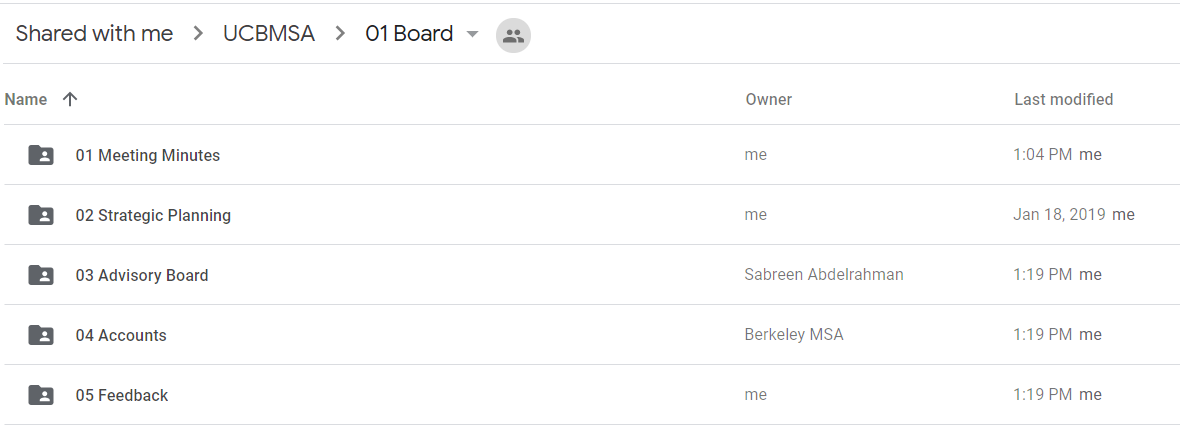
The Sort Tag is helpful because it will allow you to develop muscle memory when moving quickly between files and folders throughout your term. Without sort tags, everytime you visit high-level folders, they will be organized randomly based on last modified, forcing you to take an extra second to read through the folder names until you find the one you are looking for.
¶ Time Tag
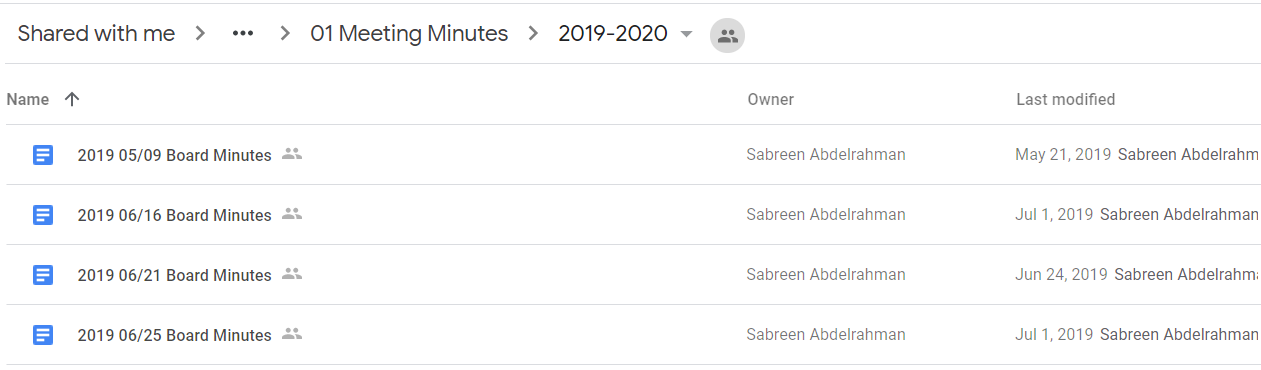
It is almost always helpful to include the date of a meeting or event in the names of associated files for that meeting or event. When doing so, follow these rules:
- Include the date at the beginning of a file name (not the end). This allows us to order files chronologically when names are sorted alphabetically.
- Use this date format:
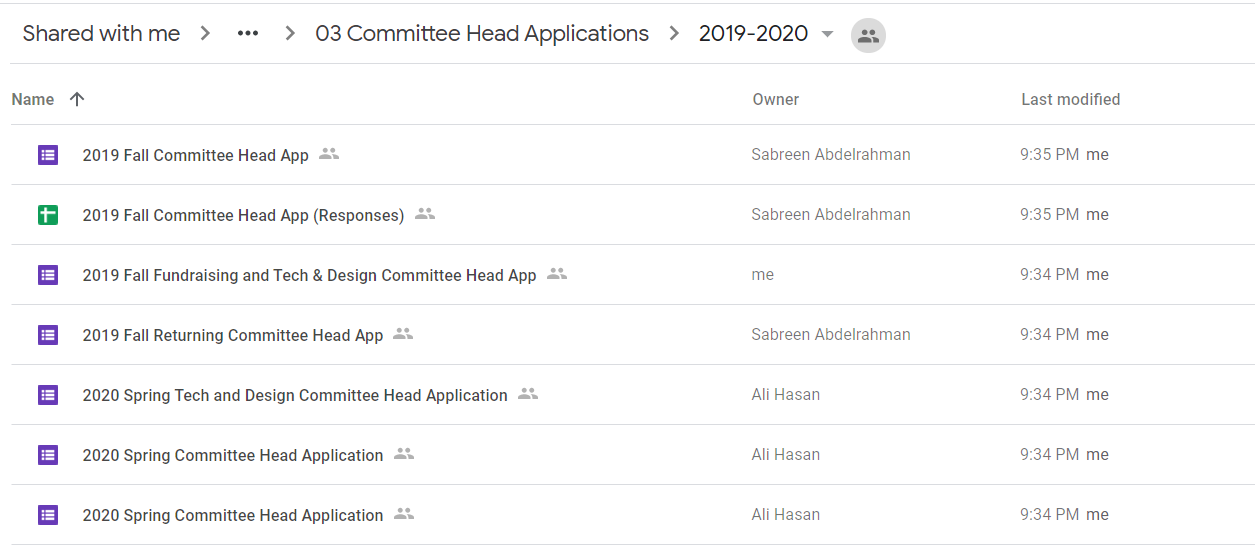
YYYY MM/DDBeginning with the largest unit of time (year) and ending with the smallest (day) allows for proper chronological ordering when names are sorted alphabetically.- Sometimes you may not need to specify a month or day (for annual events). In this case only include the year in the name.
- In other cases, you may want to specify the semester (for semesterly events). You may do this by including the semester (
SpringorFall) immediately after the date and before the name (ie2019 Spring Welcome Week Timeline)
See these rules implemented in the examples below.
Events that happen more than once per semester
Events that happen once per semester
As is true with most things, our Google Drive will need to be regularly maintained. You may come across folders that violate these guidelines. Please take the time to correct them such that they are named properly.
¶ Farsightedness
One of the most important principles that underpins the organization and usefulness of our Google Drive is the concept of farsightedness.
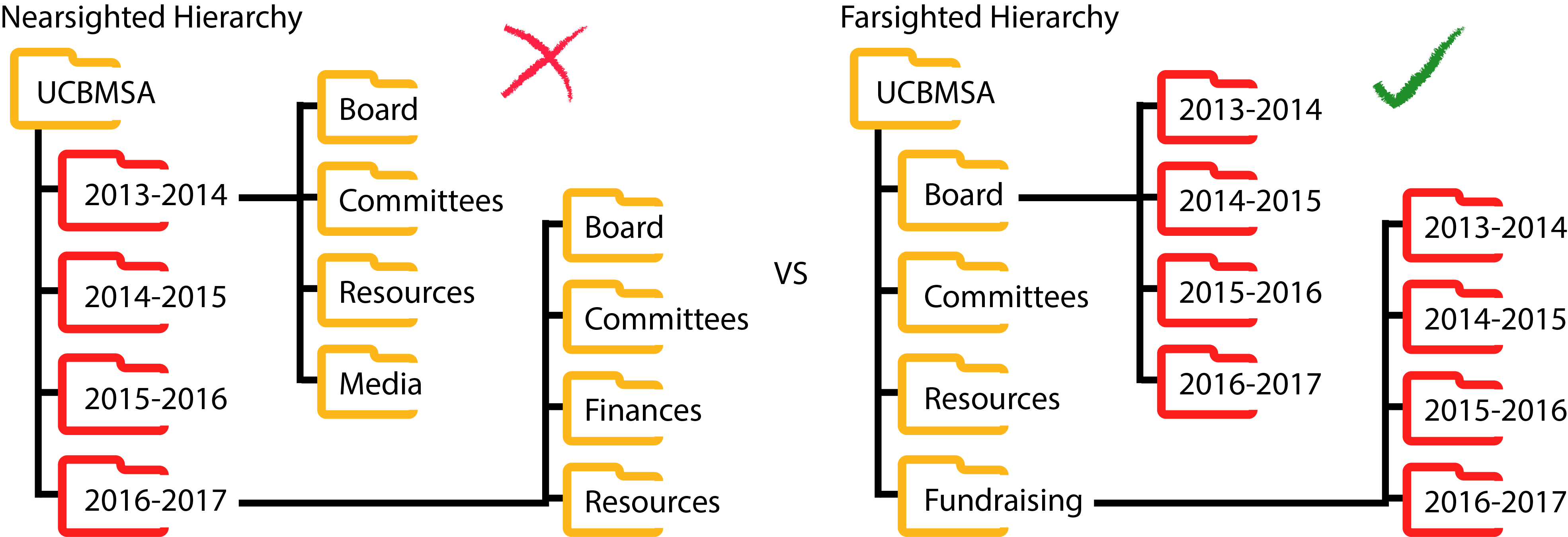
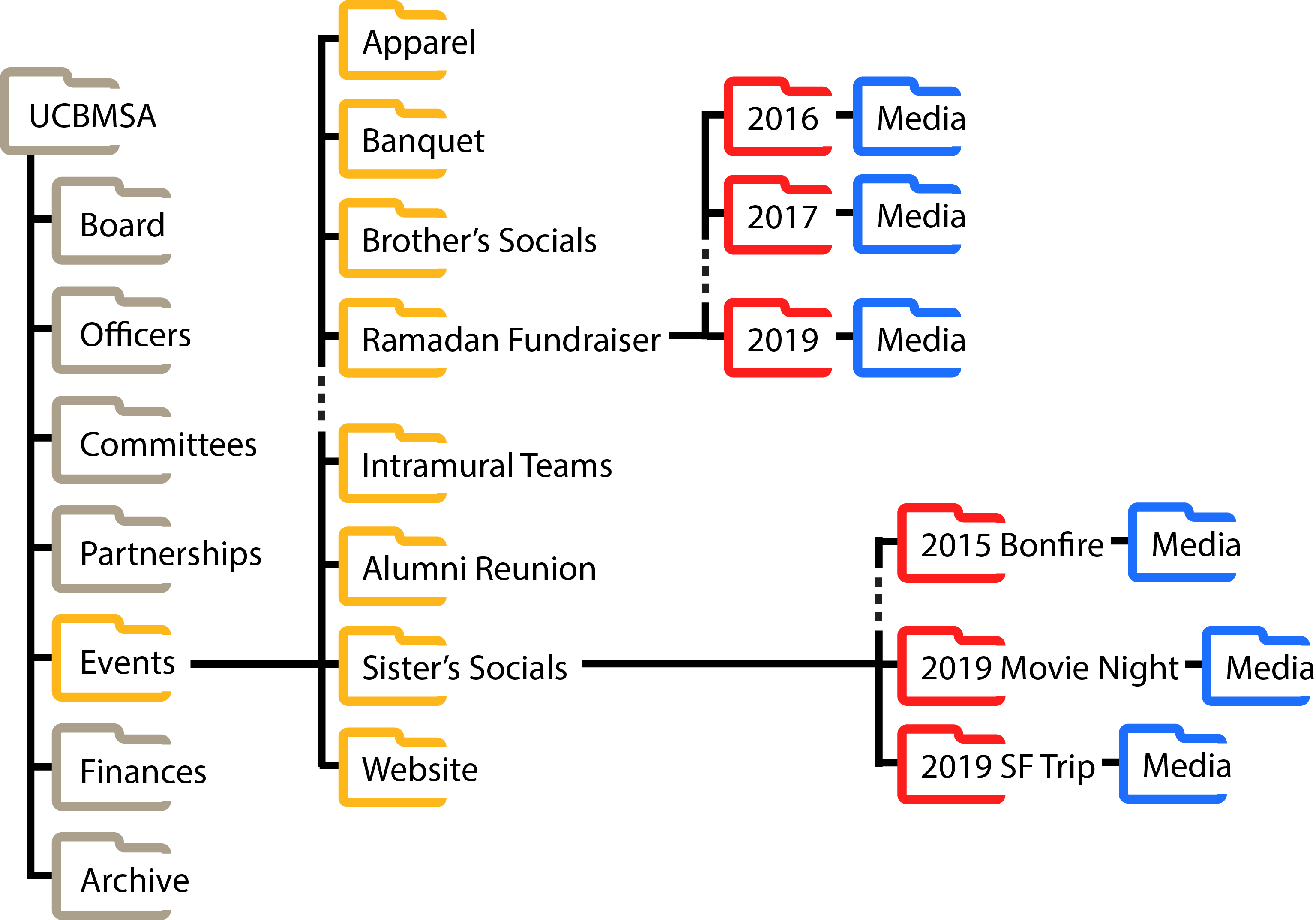
Naturally, people tend to organize files in a nearsighted hierarchy, where all folders are organized primarily by year or semester. This was the state of our drive before 2018. Since then, we've implemented a farsighted hierarchy where folders are organized primarily by function and event.
Notice in the above figure that time-specific folders are colored red. In a farsighted approach, these folders are located at the leaves of the folder tree structure. Look out for this pattern in the Google Drive tour below.
¶ Pros & Cons
Given the pros and cons summarized here, a farsighted approach removes many obstacles that stand in the path of continuity and institutional progress.
| Hierarchy Type | Pros | Cons |
|---|---|---|
| Farsighted | All resources (from across many years) that you need for a specific event are contained within a single event folder | Understanding what the MSA was able to accomplish during a specific year may require that you navigate into many event folders and search for files from that year |
| Nearsighted | A snapshot in time of the MSA's accomplishments (across all events) are contained within a single folder (although not necessarily organized) | Locating all relevant resources for a specific event requires that you navigate into each previous year's folder and conduct a thorough search |
The majority of our efforts are event-centered. Different branches of our association are tasked with the continuity of specific events and services. We benefit from having all resources from many year for a specific event stored away in one distinct event folder. As mentioned above however, the downside to farsightedness is the increased difficulty in isolating all drive files for a specific year to conduct cross-event association-wide historical analysis. To address this, we first recognize that such research tasks are infrequent, and secondly, we encourage the creation of reflective end-of-term summary documentation that more accurately describe the MSA's progress during a given term than a future student could by looking back at our Google Drive.
¶ Drive Tour
Now that we've reviewed some of the principles that inform the organization of our Google Drive, we will dive into each folder, describe what resources you can find in each. Only descriptions for folders that are not self-explanatory are included below.
¶ Board Folder
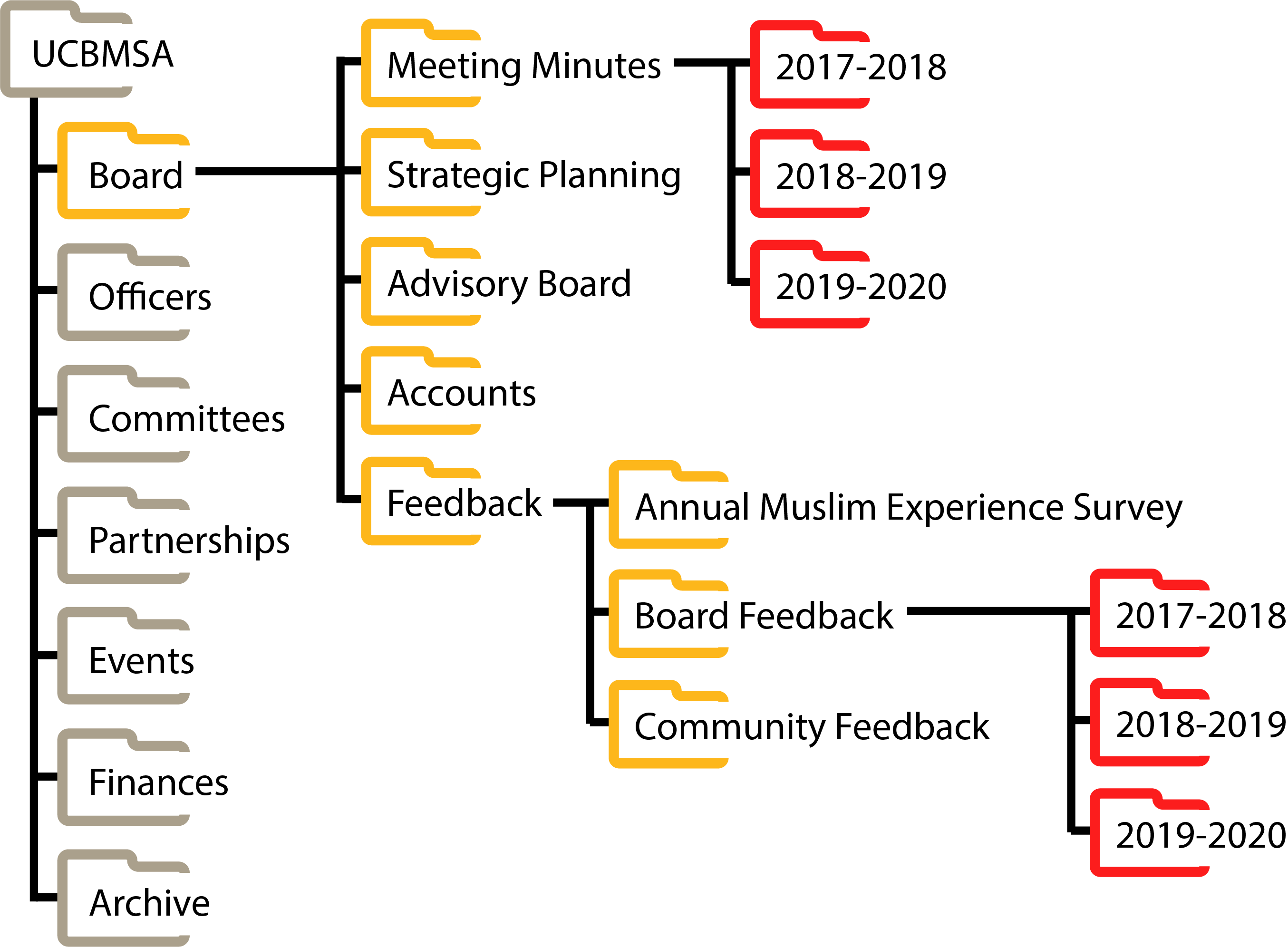
This folder contains most of meeting minutes and planning documents involved in the regular operation of the MSA board.
¶ Strategic Planning
This folder contains the documents generated every year from the MSA board's strategic planning process. This includes brainstorm lists of institutional improvements, goals, vision statements and mission statements.
¶ Advisory Board
This folders contains all meeting minutes and presentations from semesterly advisory board meetings.
¶ Accounts
This folder contains all passwords and account information for MSA's various social media accounts and technological services.
¶ Feedback
This folder contains community feedback forms that should be publicized for use by community members who prefer to voice their concerns anonymously. This folder also contains anonymous board member feedback forms for feedback between board members regarding leadership style and work ethic.
¶ Officers Folder
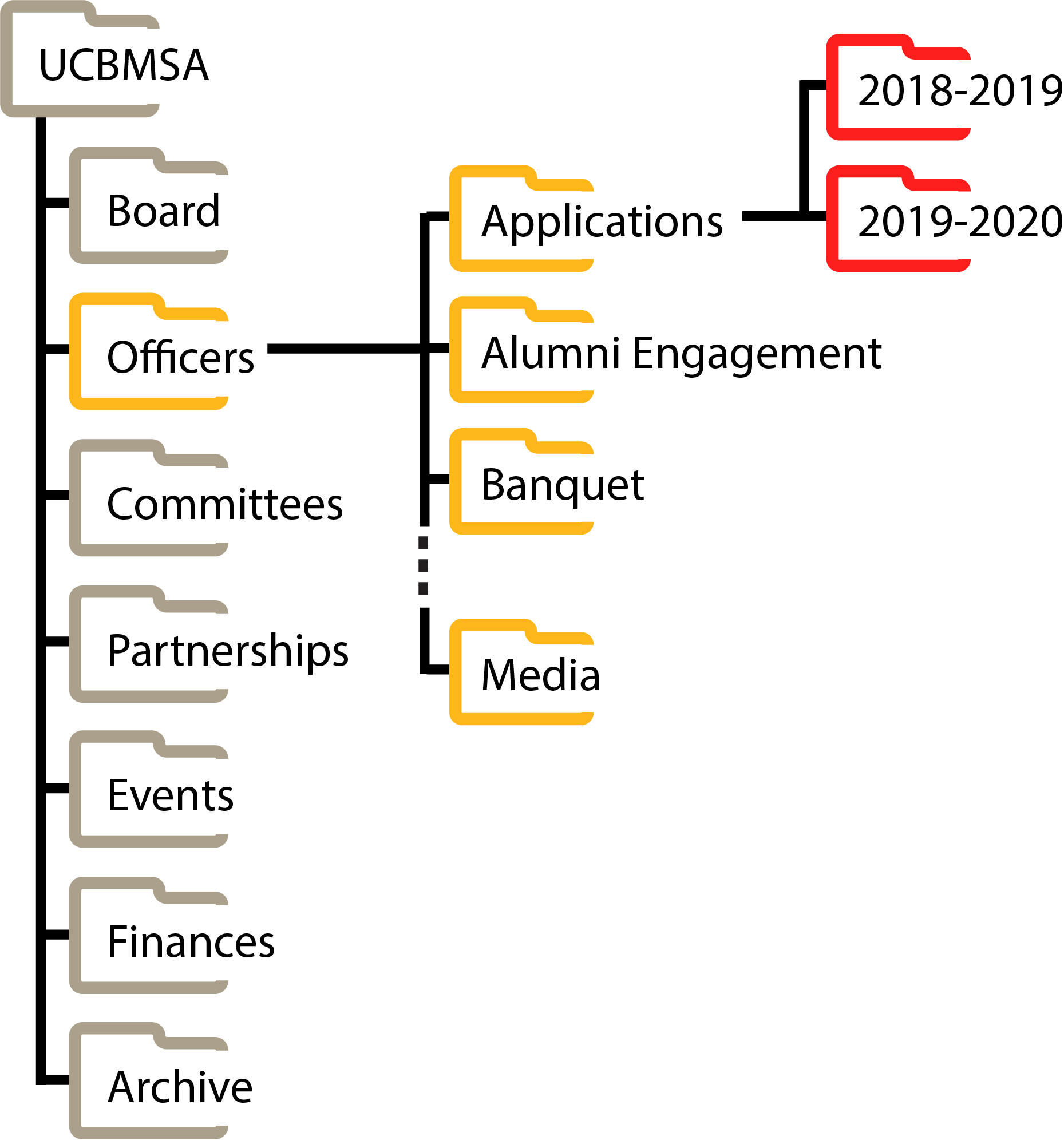
This folder contains all resources and planning documents helpful for the work of our MSA officers.
¶ Committees Folder
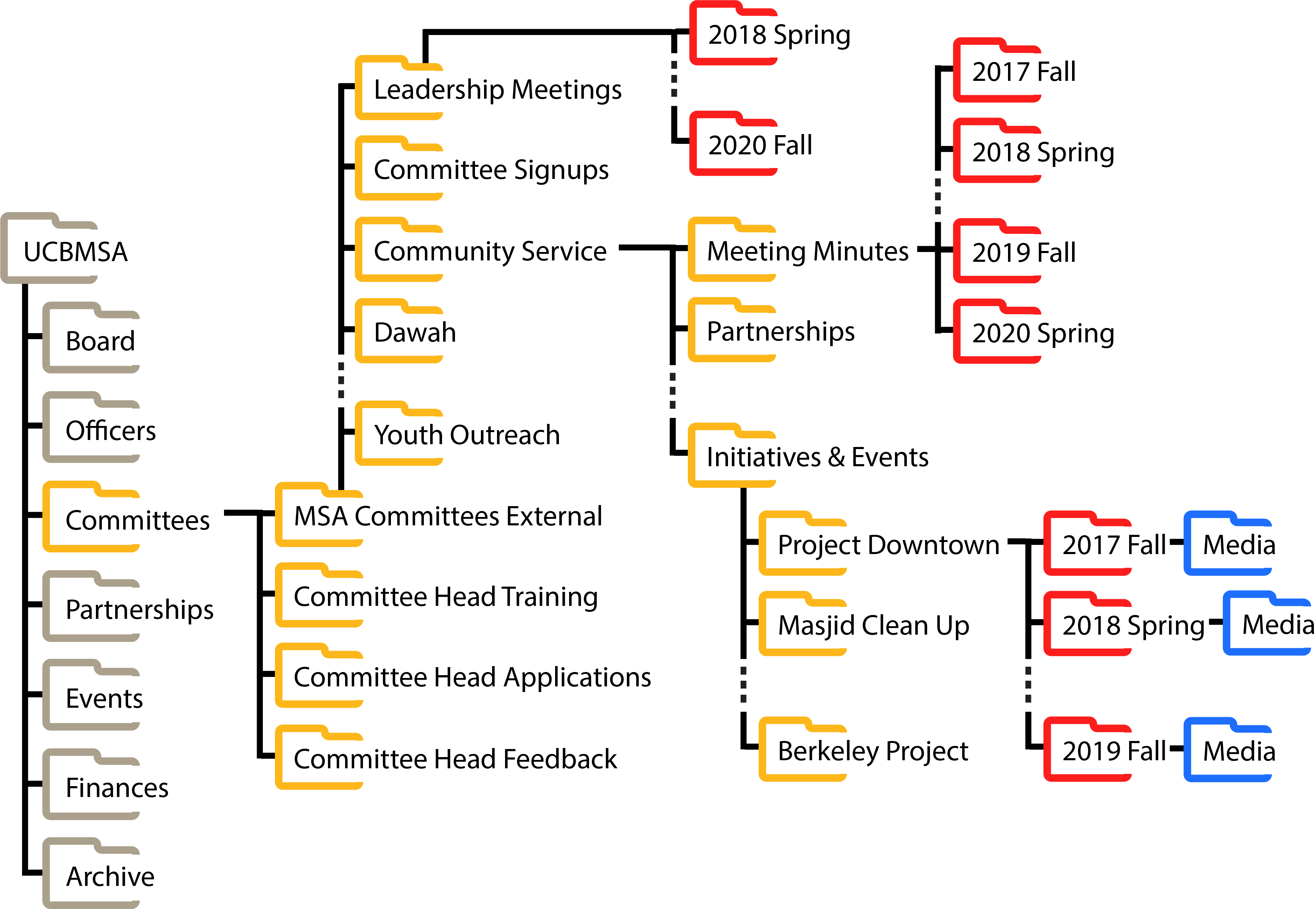
This folder contains all meeting minutes, google forms, and resources required for the management of leadership meetings, committee heads, and committee projects.
¶ MSA Committees External
This is the external folder that gets shared with all committee heads and their respective committee members. This folder should not contain any private or sensitive documents.
Initiatives & Eventsfolder. Each specific event folder contains documents and resources from a number of years.
¶ Partnerships Folder
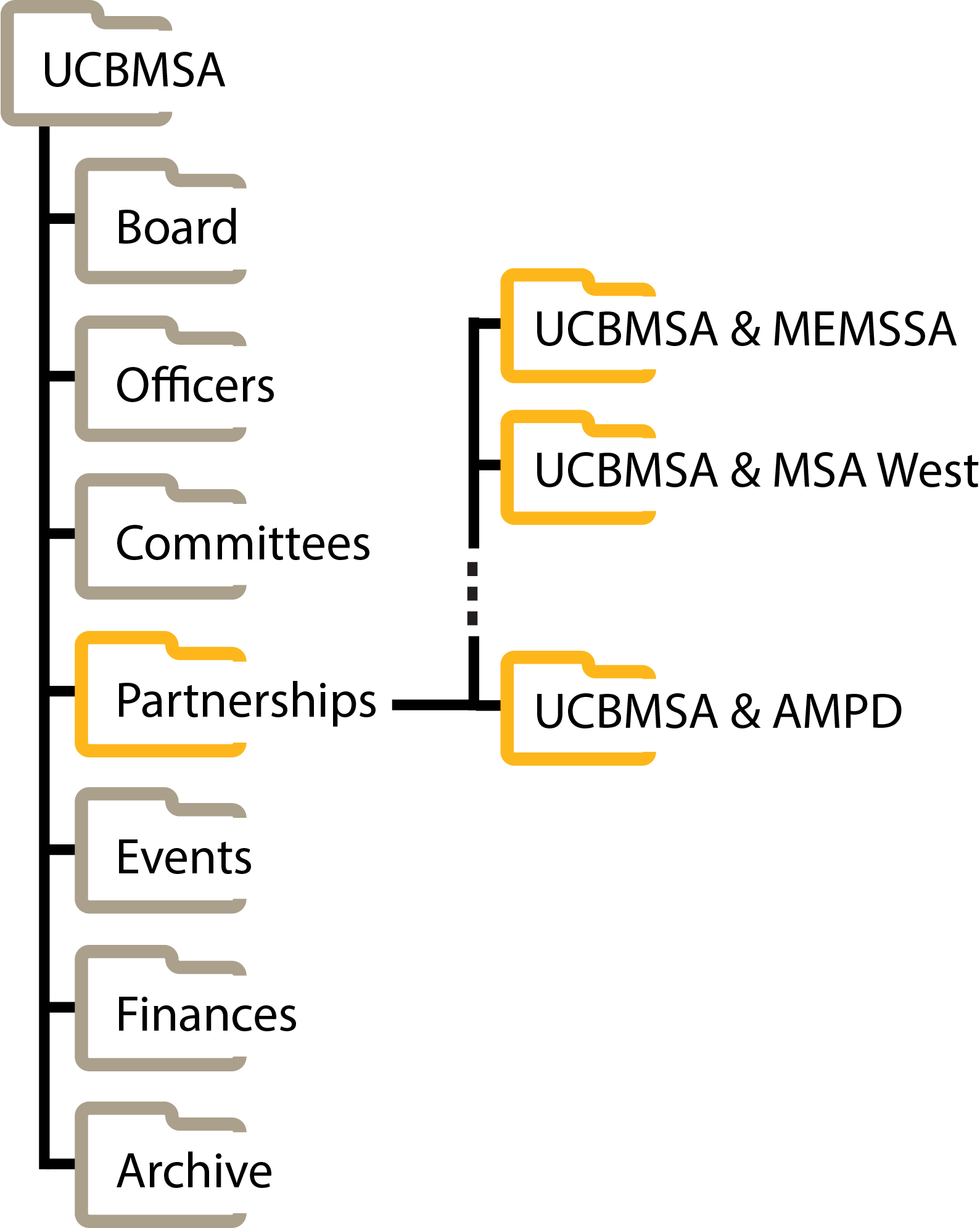
This folder contains all resources and planning documents associated with collaborations with external entities.
¶ Events, Initiatives & Services Folder
This folder contains all resources associated with all of MSA's individual events and services (excluding those managed by committees) ranging from ilm classes to our website.
¶ Finances
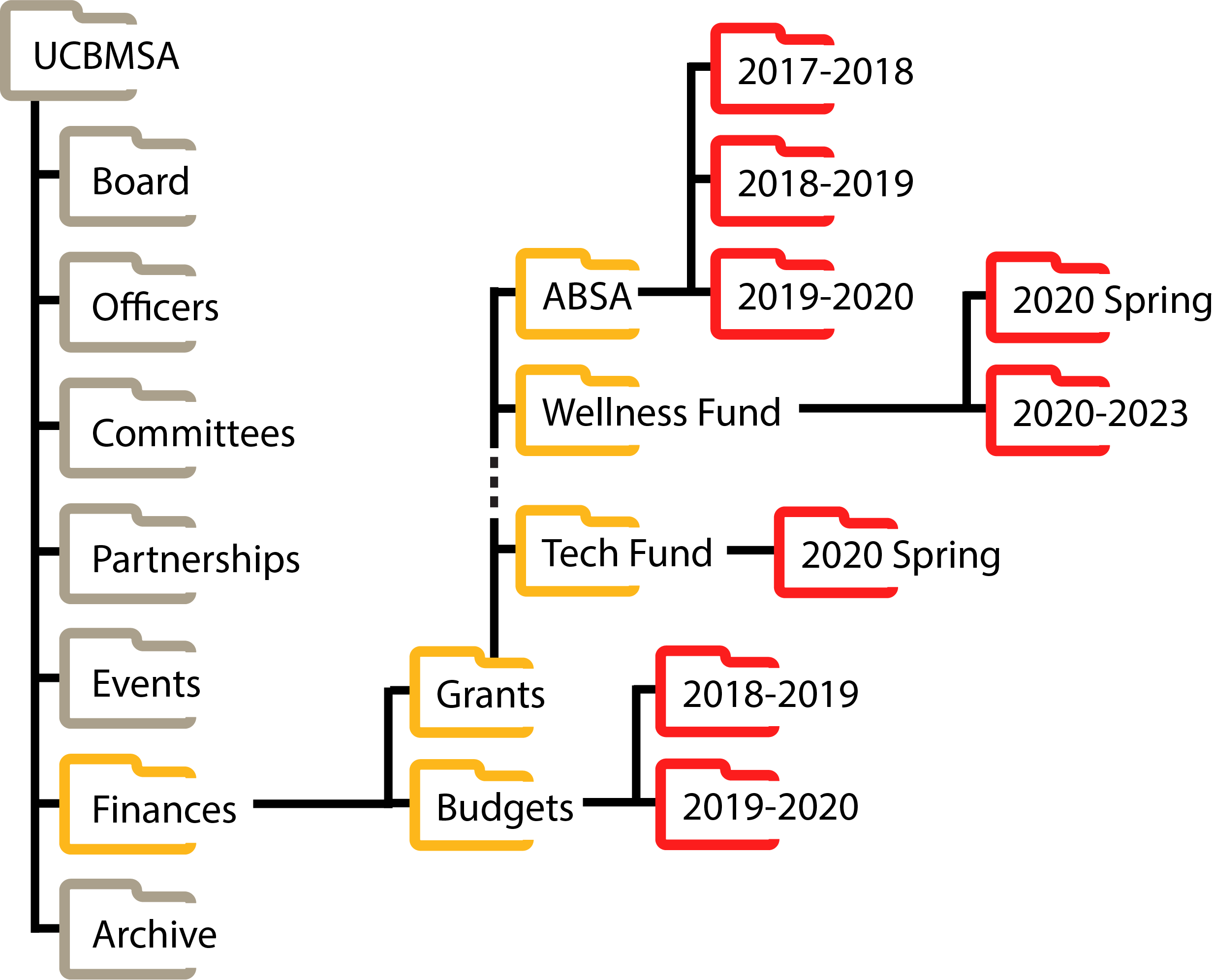
This folder contains all budget sheets and grant applications across years.
¶ Archive
This folder contains MSA documents from 2014 to 2018. You'll notice that these files are not organized because they were created before these guidelines were drafted.
¶ Updates
As the Google Drive goes through more use, these guidelines may need to change to accomodate our growing association. You can download the Adobe Illustrator file below and edit the original Google Drive directory images (embedded above).
 Directory Adobe Illustrator File For editing the directory pictures above
¶ Comprehension Quiz
If you were instructed to read this page as part of an online training curriculum, you must submit this quiz and answer all questions correctly. In the case that you do not answer a question correctly, you may view which questions were incorrect and take the quiz again.